
Kaval.AI is an opinionated Python library for building production-grade agentic workflows, chatbots and tools.
Every input, output and intermediate step is a validated Pydantic model, every run is recorded and open to inspection, and every provider is reached through a single small asynchronous interface. The result is agentic software that can be debugged, tested and operated under production conditions.
pip install "kavalai[common]"
Features
Every provider behind one interface — OpenAI, Google Gemini, Anthropic and Ollama, selected by a
provider/modelstring (see LLM clients).Structured inputs, outputs, tool calls and responses, expressed with Pydantic semantics and validated at every boundary (see Quickstart).
A complete workflow engine — a typed YAML graph with conditional routing, parallel fan-out, tool calls, agent loops and cycles (see Workflows, Workflow YAML reference).
Agents with real tools — Python functions, REST endpoints and MCP servers through a single validated kernel, restrictable per node (see Agents & tools, Bundled tools).
Retrieval-augmented generation over PostgreSQL/pgvector or a portable SQLite file, with local or hosted embeddings (see Retrieval-augmented generation (RAG)).
Streaming throughout — model tokens, per-node run events and Server-Sent Events over HTTP (see Streaming).
Self-hosted observability — every session, run, node and model call recorded in a database you own and browsable in the backoffice interface (see The database and data model, Observability, Using the Backoffice UI).
Serving included — any workflow placed behind a typed FastAPI endpoint, with optional basic authentication (see Serving a workflow over HTTP).
Client-side execution through Pyodide and WebLLM, requiring no server, no API key and no transfer of data off the device (see Running in the browser).
Deterministic tests — substitute a stub for the model and execute the graph offline (see Safety).
Evaluation and acceptance gates — a file of cases graded against the running agent, literal where the answer is a fact and model-judged where it is not, exiting non-zero for continuous integration (see Evaluation & acceptance testing).
For a comparison against LangGraph, CrewAI, n8n and Dify, including the respects in which Kaval.AI remains behind, see How Kaval.AI compares. The design that produced these properties is set out in Architecture.
Call a model
A model is named as provider/model and make_client()
does the rest. The same interface covers OpenAI, Gemini, Anthropic and
Ollama, so substituting one provider for another is a change of one string.
from kavalai import make_client

client = make_client("openai/gpt-5.6-luna")

answer = await client.prompt("What is the capital of Estonia?")
print(answer)
The capital of Estonia is **Tallinn**.
Receive data rather than prose
Supplying a Pydantic model causes the answer to be returned as a validated object, with any provider, so that no parsing step is required.
from pydantic import BaseModel

class City(BaseModel):
    name: str
    country: str
    fun_fact: str

city = await client.prompt("Describe Tallinn.", response_model=City)
print(city)
name='Tallinn' country='Estonia'
fun_fact='Tallinn’s remarkably preserved medieval Old Town is a UNESCO
          World Heritage Site, and the city is often noted as one of the
          world’s most digitally advanced capitals.'
Give the model tools
An Agent runs the model in a loop: it calls the tools it
needs — Python functions, REST endpoints or MCP servers, registered on one
FunctionKernel — and returns a typed answer.
from datetime import date

from kavalai import Agent, FunctionKernel, pythontool
from kavalai.tools.webtools.crawl4ai import web_search


@pythontool
def today() -> str:
    """Return today's date in ISO format."""
    return date.today().isoformat()


class Answer(BaseModel):
    answer: str
    sources: list[str]


kernel = FunctionKernel()
kernel.register_python_tool("today", today)
kernel.register_python_tool("web_search", web_search)

agent = Agent(llm_client=client, kernel=kernel)
result = await agent.prompt(
    "When is the next Tallinn Marathon, and how many days away is it?",
    response_model=Answer,
    max_steps=5,
)
print(result.answer)
for url in result.sources:
    print(url)
The next Tallinn Marathon is on Sunday, September 13, 2026. From today,
August 28, 2026, it is 16 days away.
https://www.jooks.ee/en/tallinn-marathon/
https://marathonscout.com/races/swedbank-tallinn-marathon
Answer from your own documents
Text is indexed once, the relevant passages are retrieved, and the model answers from them. The corpus below is the collected knowledge of Green Village, a settlement that appears in no model’s training data.
FACTS = """\
Green Village has 104 residents.
Green Village was founded on 03.09.1887 by shepherd Elias Thornbury.
President of Green Village is Thomas Cook (born 12.04.1994).
Green Village's oldest resident is Agnes Whitlow (born 02.06.1929).
The annual Turnip Festival takes place every year on the third Saturday of October.
The village bakery, run by Greta Lindqvist (born 27.11.1968), sells exactly 340 loaves every week.
Green Village's football team, FC Green Rovers, has won the regional cup twice (1997 and 2013).
Green Village's only pub, The Rusty Anchor, has been operating since 1923.
""".splitlines()
Index the facts:
from kavalai.rag import SqliteRagService

rag = SqliteRagService(":memory:", model="fastembed/BAAI/bge-small-en-v1.5")
await rag.index_batch(
    texts=FACTS,
    metadata_list=[{"village": "Green Village"}] * len(FACTS),
    source_ids=[f"fact-{i}" for i in range(len(FACTS))],
)
Query them:
question = (
    "How old was the Green Village's oldest resident "
    "on 2025 Turnip Festival?"
)

for hit in await rag.query(question, top_k=5):
    print(f"{hit.similarity:.2f}  {hit.content}")
0.79  Green Village's oldest resident is Agnes Whitlow (born 02.06.1929).
0.70  Green Village has 104 residents.
0.68  President of Green Village is Thomas Cook (born 12.04.1994).
0.67  Green Village was founded on 03.09.1887 by shepherd Elias Thornbury.
0.62  The annual Turnip Festival takes place every year on the third Saturday of October.
Retrieval is semantic rather than lexical: the question names neither “oldest” nor “Agnes”, yet the fact that answers it is ranked first.
Compose the parts into a workflow
A workflow is a typed graph: an input enters, an output leaves, and each step
is one node. The index above becomes a chatbot in two nodes — a rag_query
node fetches the closest facts for the user’s message and an llm node
answers from them. The engine validates every boundary and records every run;
the persisted structure is described in The database and data model.
from kavalai.workflow import WorkflowBuilder


class Message(BaseModel):
    user_message: str


class Reply(BaseModel):
    agent_response: str


engine = (
    WorkflowBuilder("Green Village support", llm_model="openai/gpt-5.6-luna")
    .data_model("input", Message)
    .data_model("output", Reply)
    .start("get_related_facts")
    .rag_query(
        "get_related_facts",
        query="{{ context.input.user_message }}",
        output="facts",
        top_k=5,
        store="content",
        next="reply",
    )
    .llm(
        "reply",
        prompt=(
            "You are the assistant of the Green Village tourist "
            "information centre. Answer using only these facts:\n"
            "{{ context.facts }}"
        ),
        inputs={"input": "input", "facts": "facts"},
        output="output",
        next="end",
    )
    .end()
    .build_engine(rag_services=rag)
)

state = await engine.run({"user_message": question})
print(state.output_data)
print(state.status, state.token_usage)
{'agent_response': 'Agnes Whitlow was 96 years old on the 2025 Turnip '
                   'Festival, held on 18 October 2025.'}
completed {'model_calls': 1, 'prompt_tokens': 239,
           'completion_tokens': 89, 'total_tokens': 328}
The same graph is equally expressible in YAML, and the same engine serves it over HTTP; see Workflows and Serving a workflow over HTTP.
Inspect what ran
Nothing about a run is discarded. Every session, run, node and model call is written to a database you own, and the bundled backoffice reads it: projects and their agents, whole conversations, a per-node task debugger, model-call statistics and a RAG explorer that projects the embedding space.
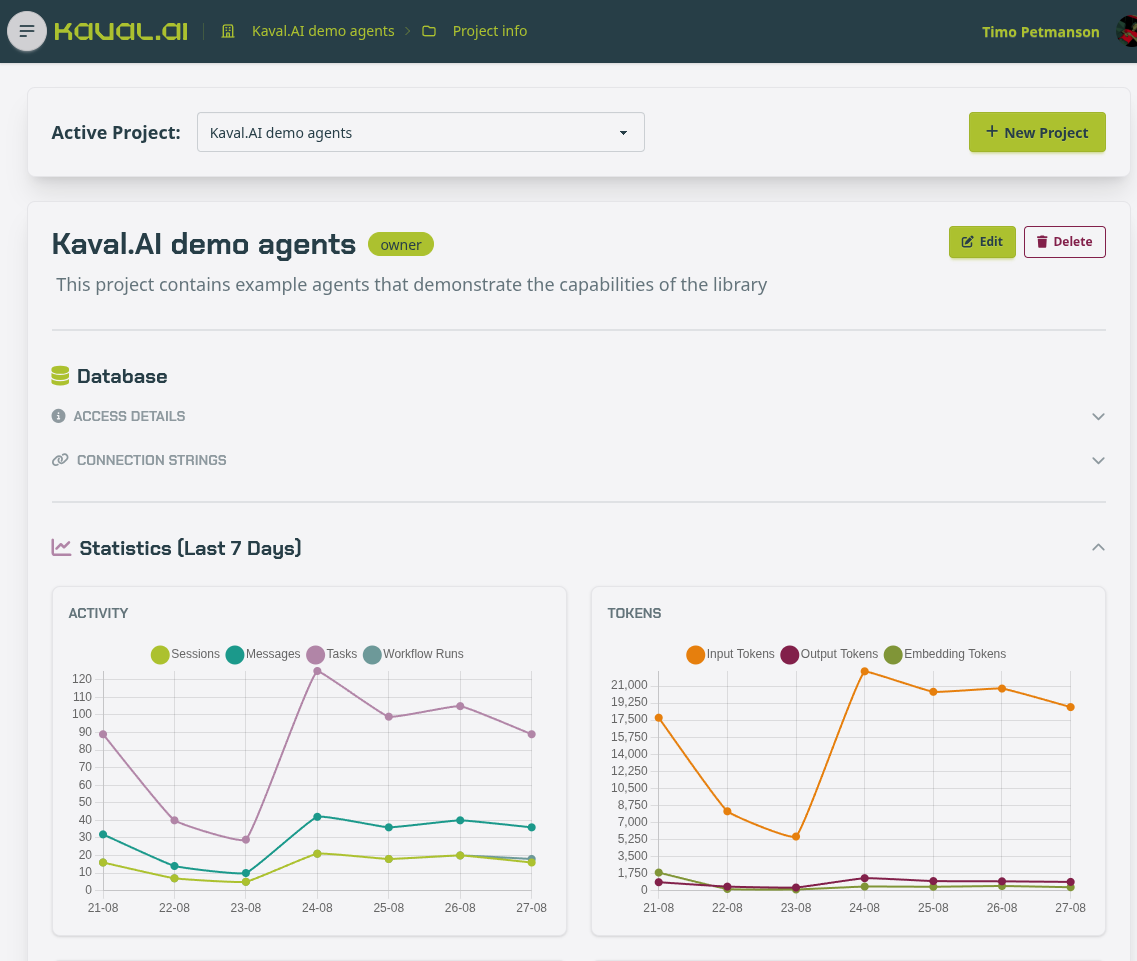
Setting the backoffice up, and what each page answers, is covered in Using the Backoffice UI; the tables it reads are described in The database and data model.
Where to start
Readers new to language models will find the vocabulary defined in Core concepts.
For a running system within a few minutes, begin at Quickstart.
For the complete treatment, begin at LLM clients and proceed in order.
For the design and its rationale, see Architecture.
For individual definitions, Reference documents the YAML keys, the bundled tools and every environment variable.
For an assessment against other frameworks, see How Kaval.AI compares.
For worked recipes, from retrieval-augmented generation to self-correcting loops, see Cookbook.
Before deploying a change, Evaluation & acceptance testing sets out how to gate it on a file of cases graded against the agent you are about to promote.